File Setup
- Single document (do not impose the document; Ex: 3-up per page)
- Document is setup to the final print size (or a specific scale: 25% or 50%)
- 3/16″ bleed
- Embedded or outlined fonts
- High resolution images at 300ppi (low resolution images will delay production of your job)
| Your Cut Size | Your Document Setup Should Be |
|---|---|
| 3.5″ x 2″ | 3.75″ x 2.25″ |
| 6″ x 4″ | 6.25″ x 4.25″ |
| 8.5″ x 11″ | 8.75″ x 11.25″ |
| 11″ x 17″ | 11.25″ x 17.25″ |
Print Terminology
Often printing just one or two spot colors is less costly than running the job on a full-color (4-color) press, especially when printing stationery items. Even though the price for full color will become lower over time, spot colors would still be preferred when printing colored text because it produces a finer image.
Very bright hues like a vibrant orange, any flourescent or metallic colors can only be printed with Pantone inks.
Paper Weight Conversion Guide
| Bond/Ledger | Offset/Text | Cover | Tag | Index | Points(PT) | caliper | Milimeters/Mil | Grams per sq meter |
|---|---|---|---|---|---|---|---|---|
| 16 | 40 | 22 | 37 | 33 | 3.2 | 0.0032 | 0.081 | 60.2 gsm |
| 18 | 45 | 24 | 41 | 37 | 3.6 | 0.0036 | 0.092 | 67.72 gsm |
| 20 | 50 | 28 | 46 | 42 | 3.8 | 0.0038 | 0.097 | 75.2 gsm |
| 24 | 60 | 33 | 56 | 50 | 4.8 | 0.0048 | 0.12 | 90.3 gsm |
| 28 | 70 | 39 | 64 | 58 | 5.8 | 0.0058 | 0.147 | 105.35 gsm |
| 29 | 73 | 40 | 62 | 60 | 6 | 0.006 | 0.152 | 109.11 gsm |
| 31 | 81 | 45 | 73 | 66 | 6.1 | 0.0061 | 0.155 | 116.63 gsm |
| 32 | 85 | 45 | 74 | 67 | 6.15 | 0.00615 | 0.156 | 120 gsm |
| 35 | 90 | 48 | 80 | 74 | 6.2 | 0.0062 | 0.157 | 131.68 gsm |
| 36 | 90 | 50 | 82 | 75 | 6.8 | 0.0068 | 0.173 | 135.45 gsm |
| 39 | 100 | 54 | 90 | 81 | 7.2 | 0.0072 | 0.183 | 146.73 gsm |
| 40 | 100 | 56 | 93 | 83 | 7.3 | 0.0073 | 0.185 | 150.5 gsm |
| 43 | 110 | 60 | 100 | 90 | 7.4 | 0.0074 | 0.188 | 161.78 gsm |
| 44 | 110 | 61 | 102 | 92 | 7.6 | 0.0076 | 0.193 | 165.55 gsm |
| 47 | 120 | 65 | 108 | 97 | 8 | 0.0078 | 0.198 | 176.83 gsm |
| 53 | 135 | 74 | 122 | 110 | 9 | 0.0085 | 0.216 | 199.41 gsm |
| 54 | 137 | 75 | 125 | 113 | 9 | 0.009 | 0.229 | 203.17 gsm |
| 58 | 146 | 80 | 134 | 120 | 9.5 | 0.0092 | 0.234 | 218.22 gsm |
| 65 | 165 | 90 | 150 | 135 | 10 | 0.0095 | 0.241 | 244.56 gsm |
| 67 | 170 | 93 | 156 | 140 | 10.5 | 0.01 | 0.25 | 252.08 gsm |
| 72 | 183 | 100 | 166 | 150 | 11 | 0.011 | 0.289 | 270.9 gsm |
| 76 | 192 | 105 | 175 | 158 | 13 | 0.013 | 0.33 | 285.95 gsm |
| 82 | 208 | 114 | 189 | 170 | 14 | 0.014 | 0.356 | 308.52 gsm |
| 87 | 220 | 120 | 200 | 180 | 15 | 0.015 | 0.38 | 312 gsm |
| 105 | 267 | 146 | 244 | 220 | 18 | 0.0175 | 0.445 | 385.06 gsm |
Envelope Style Guide
When choosing envelopes, remember that the U.S. Postal Service imposes a surcharge on non-standard size letters that cannot be processed by automated sorting machinery. The #10 envelope is the standard size for U.S. business correspondence.
Below are some common envelope styles along with accepted postal requirements for First-Class Mail.
| Ref # | Envelope size | Enclosure size |
|---|---|---|
| A-2 | 4 3⁄8” x 5 3⁄4“ | 4 3⁄16” x 5 1⁄2“ |
| A-6 | 4 3⁄4” x 6 1⁄2“ | 4 5⁄8” x 6 3⁄16“ |
| A-7 | 5 1⁄4” x 7 1⁄4“ | 4″ x 6 7⁄8“ |
| A-8 | 5 1⁄2” x 8 1⁄8“ | 5 1⁄4” x 7 3⁄4“ |
| A-Long | 3 7⁄8” x 8 7⁄8“ | 3 3⁄4” x 8 5⁄8“ |
| A-10 | 6″ x 9 1⁄2“ | 5 3⁄4” x 8 5⁄8“ |
| Slimline | 3 7⁄8” x 8 7⁄8“ | 3 5⁄8” x 8 5⁄8“ |
 Commercial: Side with opening allows for overall printing. A favorite for booklets, catalogs, folders, annual reports and more.
| Ref # | Envelope size | Enclosure size |
|---|---|---|
| 6 1⁄4 | 3 1⁄2” x 6″ | 3 1⁄4” x 5 1⁄4“ |
| 6 3⁄4 | 3 5⁄8” x 6 1⁄2“ | 3 1⁄2” x 6 1⁄4“ |
| 7 | 3 3⁄4” x 6 3⁄4“ | |
| 7 3⁄4 | 3 7⁄8” x 7 1⁄2“ | 3 3⁄4” x 7 1⁄4“ |
| 8 5⁄8 | 3 5⁄8” x 8 5⁄8“ | |
| 9 | 3 7⁄8” x 8 7⁄8“ | 3 3⁄4” x 8 5⁄8“ |
| 10 | 4 1⁄8” x 9 1⁄2“ | 4″ x 9 1⁄4“ |
| 11 | 4 1⁄2” x 10 3⁄8“ | 4 1⁄4” x 10 1⁄8“ |
| 12 | 4 3⁄4” x 11″ | |
| 14 | 5 ” x 11 1⁄2“ |
 Booklet: Side with opening allows for overall printing. A favorite for booklets, catalogs, folders, annual reports and more.
| Ref # | Envelope size | Enclosure size |
|---|---|---|
| 3 | 4 3⁄4” x 6 1⁄2“ | 4 1⁄2” x 6″ |
| 4 1⁄2 | 5 1⁄2” x 7 1⁄2“ | 5 1⁄4” x 7″ |
| 5 | 5 1⁄2” x 8 1⁄8“ | |
| 6 | 5 3⁄4” x 8 7⁄8“ | 5 1⁄2” x 8 3⁄8“ |
| 6 1⁄2 | 6″ x 9″ | 5 3⁄4” x 8 1⁄2“ |
| 6 5⁄8 | 6″ x 9 1⁄2“ | 5 3⁄4” x 9″ |
| 6 3⁄4 | 6 1⁄2” x 9 1⁄2“ | 6 1⁄4” x 9″ |
| 7 1⁄4 | 7″ x 10″ | 6 3⁄4” x 9 1⁄2“ |
| 7 1⁄2 | 7 1⁄2” x 10 1⁄2“ | 7 1⁄4” x 10″ |
| 9 | 8 3⁄4” x 11 1⁄2“ | 8 1⁄2” x 11″ |
| 9 1⁄2 | 9″ x 12″ | 8 3⁄4” x 11 1⁄2“ |
| 10 | 9 1⁄2” x 12 5⁄8“ | 9 1⁄4” x 12 1⁄8“ |
| 13 | 10″ x 13″ | 9 3⁄4” x 12 1⁄2“ |
 Catalog: Large envelopes used for catalogs magazines, folders, reports and more. Gummed flap provides protection for heavy contents.
| Ref # | Envelope size | Enclosure size |
|---|---|---|
| 1 | 6″ x 9″ | 5 3⁄4” x 8 1⁄2“ |
| 1 3⁄4 | 6 1⁄2” x 9 1⁄2“ | 6 1⁄4” x 9″ |
| 3 | 7″ x 10″ | 6 3⁄4” x 9 1⁄2“ |
| 6 | 7 1⁄2” x 10 1⁄2“ | 7 1⁄4” x 10″ |
| 8 | 8 1⁄4” x 11 1⁄4“ | |
| 8 1⁄2 | 8 1⁄2” x 10 1⁄2“ | 8 1⁄4” x 10″ |
| 9 3⁄4 | 8 3⁄4” x 11 1⁄4“ | 8 1⁄2” x 10 3⁄4“ |
| 10 1⁄2 | 9″ x 12″ | 8 3⁄4” x 11 1⁄2“ |
| 12 1⁄2 | 9 1⁄2” x 12 1⁄2“ | 9 1⁄4” x 12″ |
| 13 1⁄2 | 10″ x 13″ | 9 3⁄4” x 12 1⁄2“ |
| 14 1⁄2 | 11 1⁄2” x 14 1⁄2“ | 11 1⁄4” x 14″ |
| 15 | 10″ x 15″ | 9 3⁄4” x 14 1⁄2“ |
| 15 1⁄2 | 12″ x 15 1⁄2“ | 11 3⁄4” x 15″ |
 Square: Frequently specified by designers because they make a very uniform, and strong presentation.
| Ref # | Envelope size | Enclosure size |
|---|---|---|
| 5 | 5″ x 5″ | 4 3⁄4” x 4 3⁄4“ |
| 5 1⁄2 | 5 1⁄2” x 5 1⁄2“ | 5 1⁄4” x 5 1⁄4“ |
| 6 | 6″ x 6″ | 5 3⁄4” x 5 3⁄4“ |
| 6 1⁄2 | 6 1⁄2” x 6 1⁄2“ | 6 1⁄4” x 6 1⁄4“ |
| 7 | 7″ x 7″ | 6 3⁄4” x 6 3⁄4“ |
| 7 1⁄2 | 7 1⁄2” x 7 1⁄2“ | 7 1⁄4” x 7 1⁄4“ |
| 8 | 8″ x 8″ | 7 3⁄4” x 7 3⁄4“ |
| 8 1⁄2 | 8 1⁄2” x 8 1⁄2“ | 8 1⁄4” x 8 1⁄4“ |
| 9 | 9″ x 9″ | 8 3⁄4” x 8 3⁄4“ |
| 9 1⁄2 | 9 1⁄2” x 9 1⁄2“ | 9 1⁄4” x 9 1⁄4“ |
| 13 1⁄2 | 13 1⁄2” x 13 1⁄2“ | 13 1⁄4” x 13 1⁄4“ |
 Ticket: Used for movie, concert, and theater tickets.
| Ref # | Envelope size | Enclosure size |
|---|---|---|
| A-2 | 4 3⁄8” x 5 3⁄4“ | 4 3⁄16” x 5 1⁄2“ |
| A-6 | 4 3⁄4” x 6 1⁄2“ | 4 5⁄8” x 6 3⁄16“ |
Window: Allows the name and address on encloser to show which eliminates the need to print or label the face of the envelope. Used for invoices, statements, paychecks, receipts, and more.
| Ref # | Envelope size | Window size |
|---|---|---|
| 6 1⁄4 | 3 1⁄2” x 6″ | 1 1⁄8” x 4 1⁄2“ |
| 6 3⁄4 | 3 5⁄8” x 6 1⁄2“ | 1 1⁄8” x 4 1⁄2“ |
| 7 | 3 3⁄4” x 6 3⁄4“ | 1 1⁄8” x 4 1⁄2“ |
| 73⁄4, Monarch | 3 7⁄8” x 7 1⁄2“ | 1 1⁄8” x 4 1⁄2“ |
| 8 5⁄8, Check | 3 5⁄8” x 8 5⁄8“ | 1 1⁄8” x 4 1⁄2“,1″ x 4” |
| 9 | 3 7⁄8” x 8 7⁄8“ | 1 1⁄8” x 4 1⁄2“ |
| 10 | 4 1⁄8” x 9 1⁄2“ | 1 1⁄8” x 4 1⁄2“ |
| 11 | 4 1⁄2” x 10 3⁄8“ | 1 1⁄8” x 4 1⁄2“ |
| 12 | 4 2⁄4” x 11″ | 1 1⁄8” x 4 1⁄2“ |
| 14 | 5″ x 11 1⁄2“ | 1 1⁄8” x 4 1⁄2“ |
 Two-way remittance: This is a dual purpose envelope. The large flap can be printed with a message, detached at the perforation, inserted in the envelope and sealed. Allows the name and address on encloser to show. Used for direct mail, coupons, applications, statements, and more.
| Ref # | Envelope size | Enclosure size |
|---|---|---|
| 6 1⁄4 | 3 1⁄2” x 6″ | |
| 6 1⁄2 | 3 1⁄2” x 6 1⁄4“ | |
| 6 3⁄4 | 3 5⁄8” x 6 1⁄2“ | 3 1⁄4” x 6 1⁄4“ |
| 9 | 3 7⁄8” x 8 7⁄8“ | |
| 10 | 4 1⁄8” x 9 1⁄2“ | 4″ x 9 1⁄4“ |
 Self-sealing: This envelope has two latex surfaces that seal on contact. Flaps are folded down to allow for printing.
| Ref # | Envelope size | Enclosure size |
|---|---|---|
| 6 3⁄4“ | 3 5⁄8” x 6 1⁄2“ | 3 1⁄2” x 6 1⁄4“ |
| 7 3⁄4“ | 3 7⁄8” x 7 1⁄2“ | 3 3⁄4” x 7 1⁄4“ |
| 10 | 4 1⁄8” x 9 1⁄2“ | 4″ x 9 1⁄4“ |
How do I send photos from my iPhone for a canvas print?
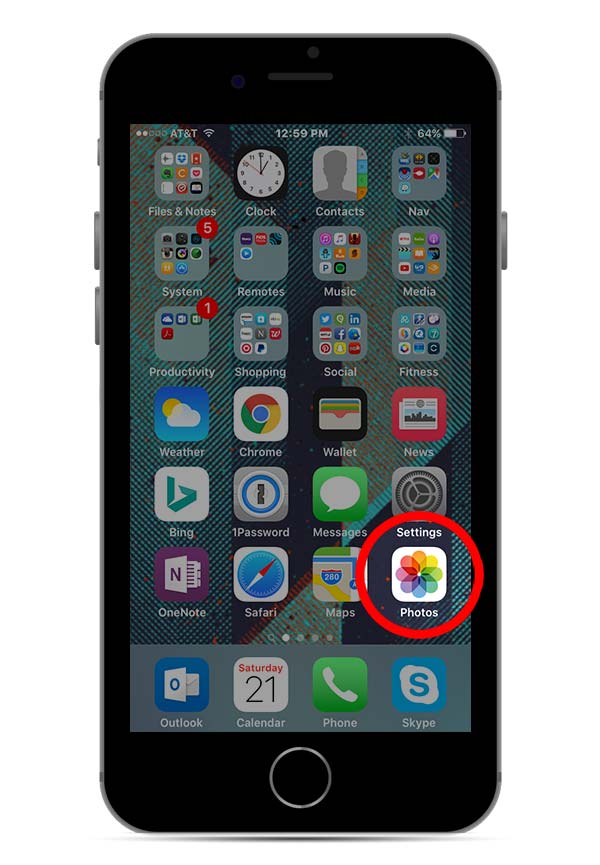
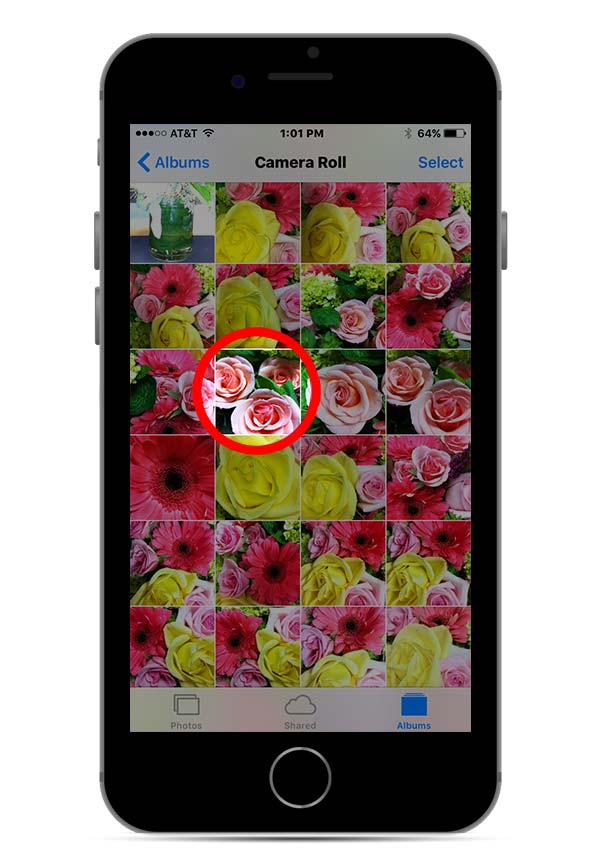
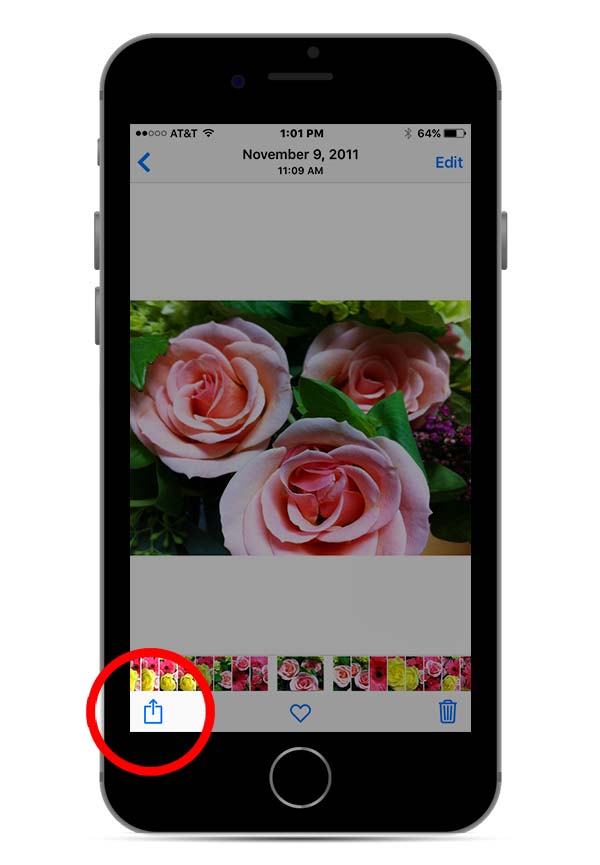
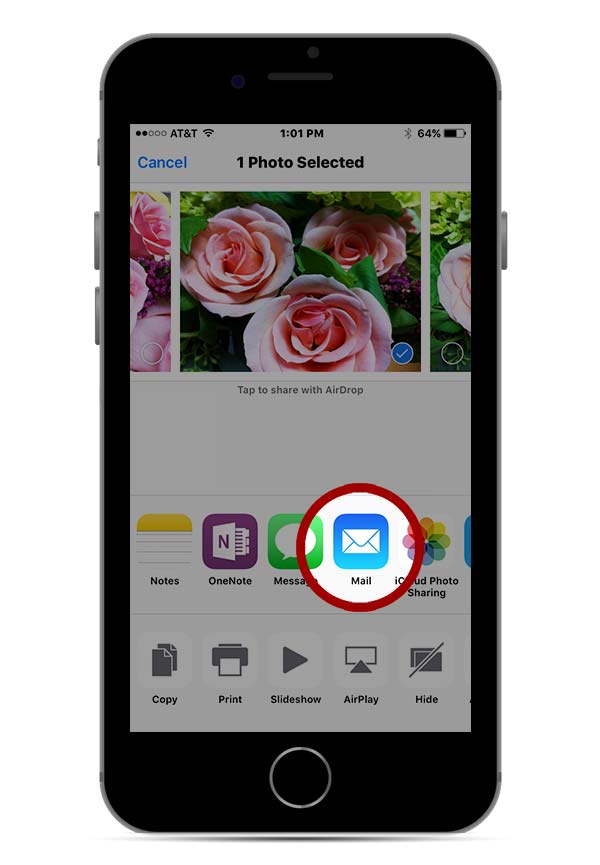
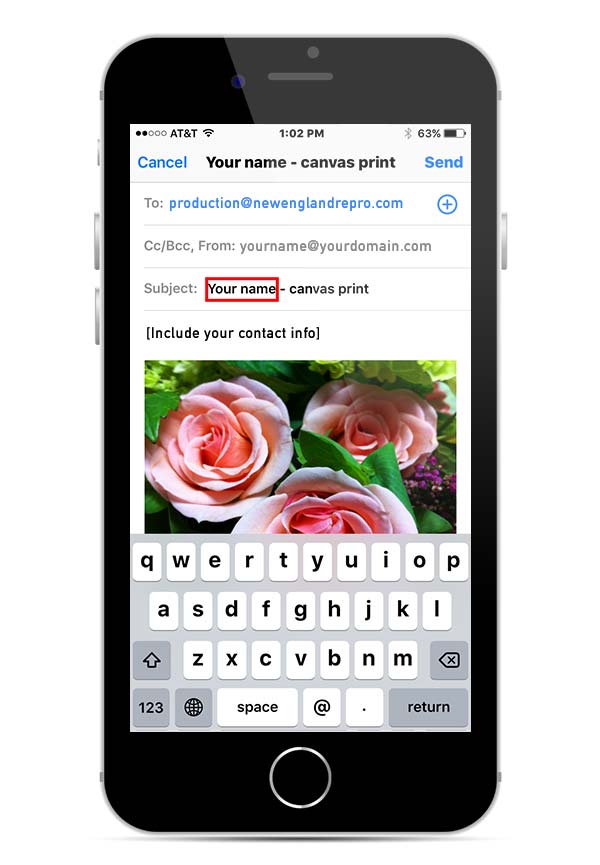
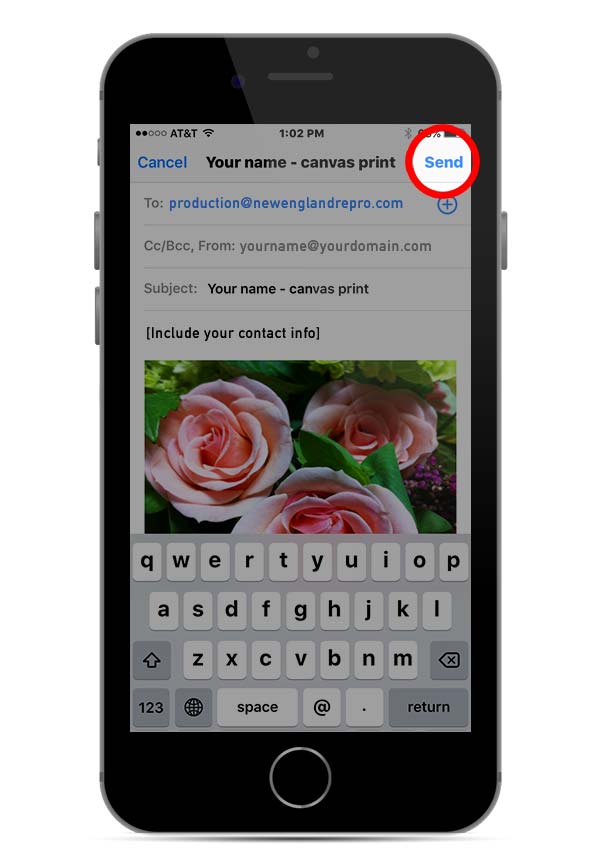
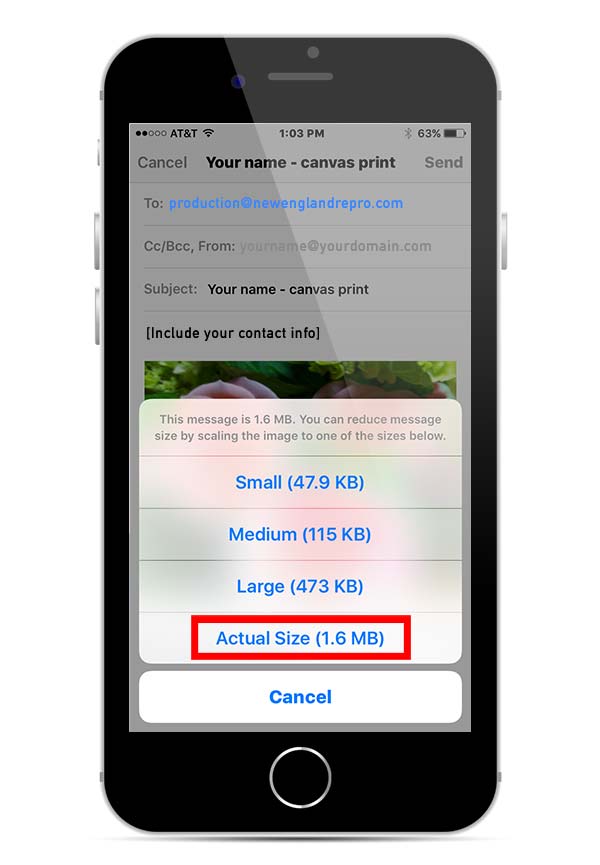
Follow the captions below to email us your photos. You can submit an order online or you can include the desired canvas size in your email. View available canvas sizes and pricing.
A good quality print depends on the amount of enlargement and quality of the original image. Smaller canvases (16×20 and less) generally require a 1.5MB image at best quality for fine detail. Whenever possible, provide the highest resolution file available.
Images that have been texted to you or taken from the web (not recommended) are often not suitable for printing because they are highly compressed.
If the photo quality isn’t ideal for print as-is, an artistic image effect can be applied to improve the appearance of your image.